Scientific Layout Mapping • GeoGebra Workflow • DoVastu System

GeoGebra Vastu System Kit

Scientific Layout Mapping Framework for DoVastu

GeoGebra Vastu System Kit

True DirectionEvery analysis begins with verified orientation.
Scaled LayoutPlans are measured, not assumed.
16-Zone GridProperty logic becomes geometrically visible.
Practical CorrectionDiagnosis is translated into usable action.
GeoGebra
Vastu Grid
Visual structure

Suggested Visual Blocks for This Methodology

These placeholders stay inside the page so you can later insert actual screenshots, charts, floor plans, or client report visuals without changing the structure.

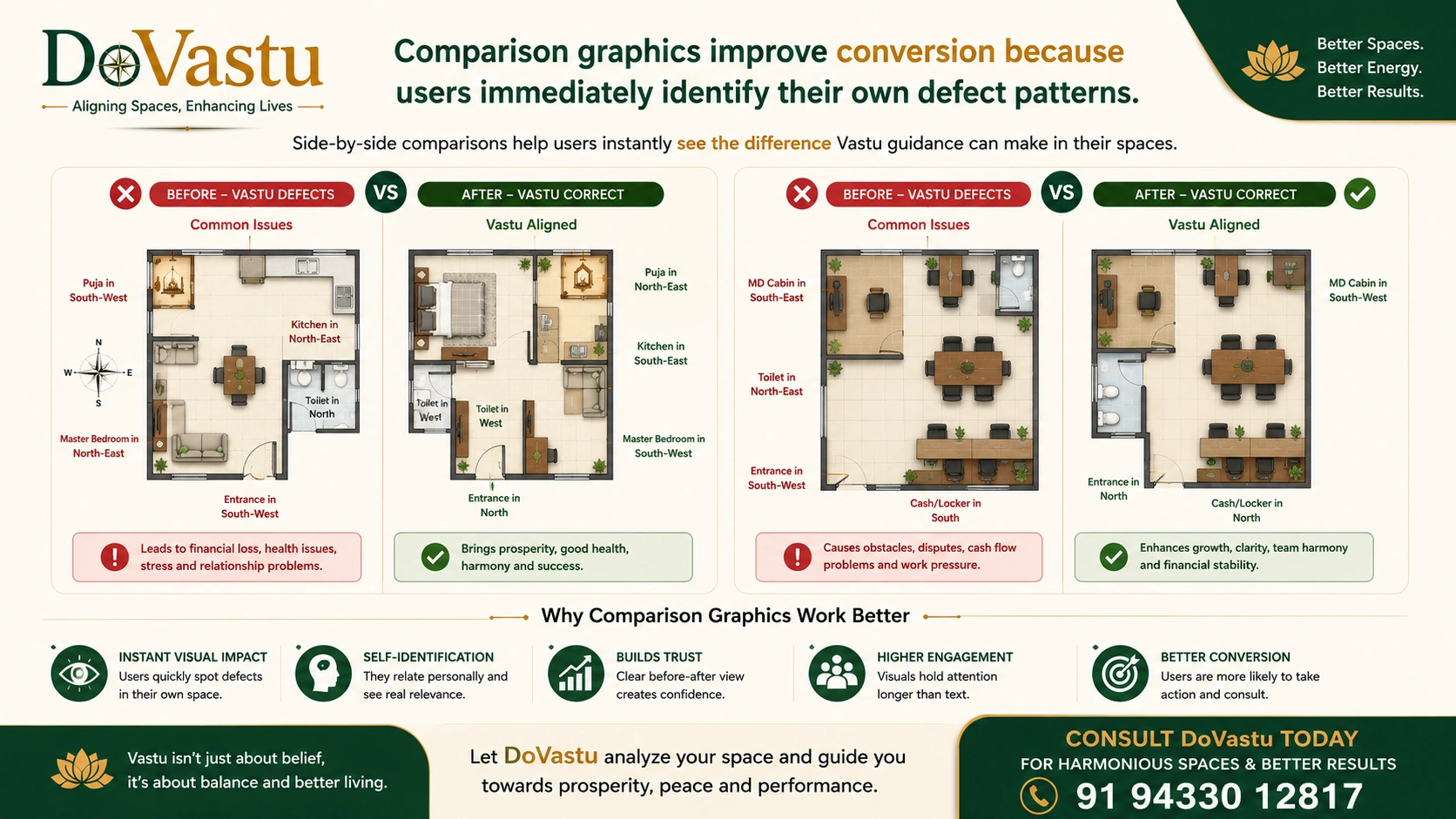
DoVastu floorplan comparison for better results Upload Master Grid Overview
Projects/DoVastu floorplan comparison for better results.png

Ideal for a visual explaining the entire GeoGebra-based Vastu gridding framework.

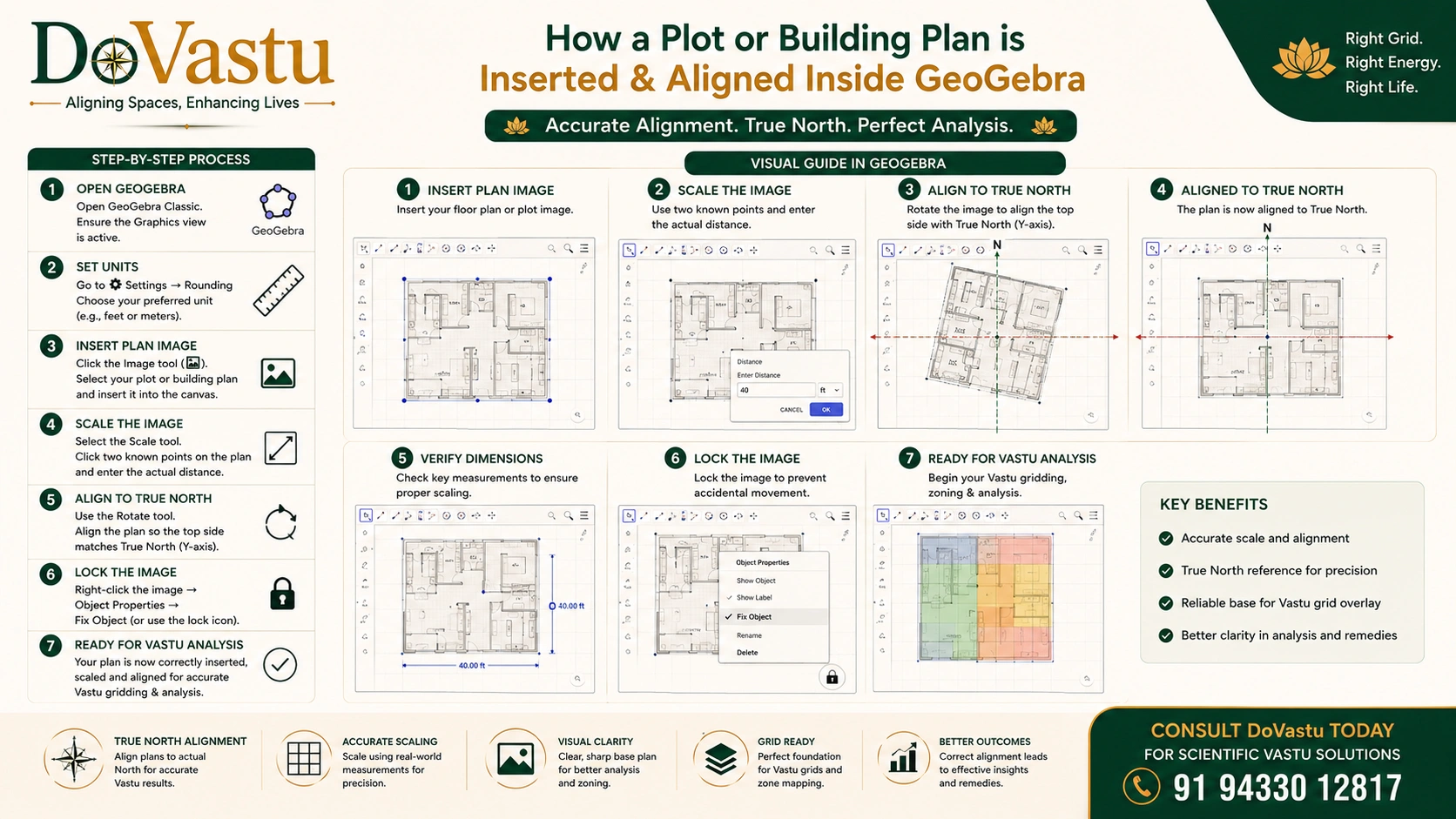
How to align plans in GeoGebra Upload Imported Layout Example
images/geogebra-2.jpg

Show how a plot or building plan is inserted and aligned inside GeoGebra.

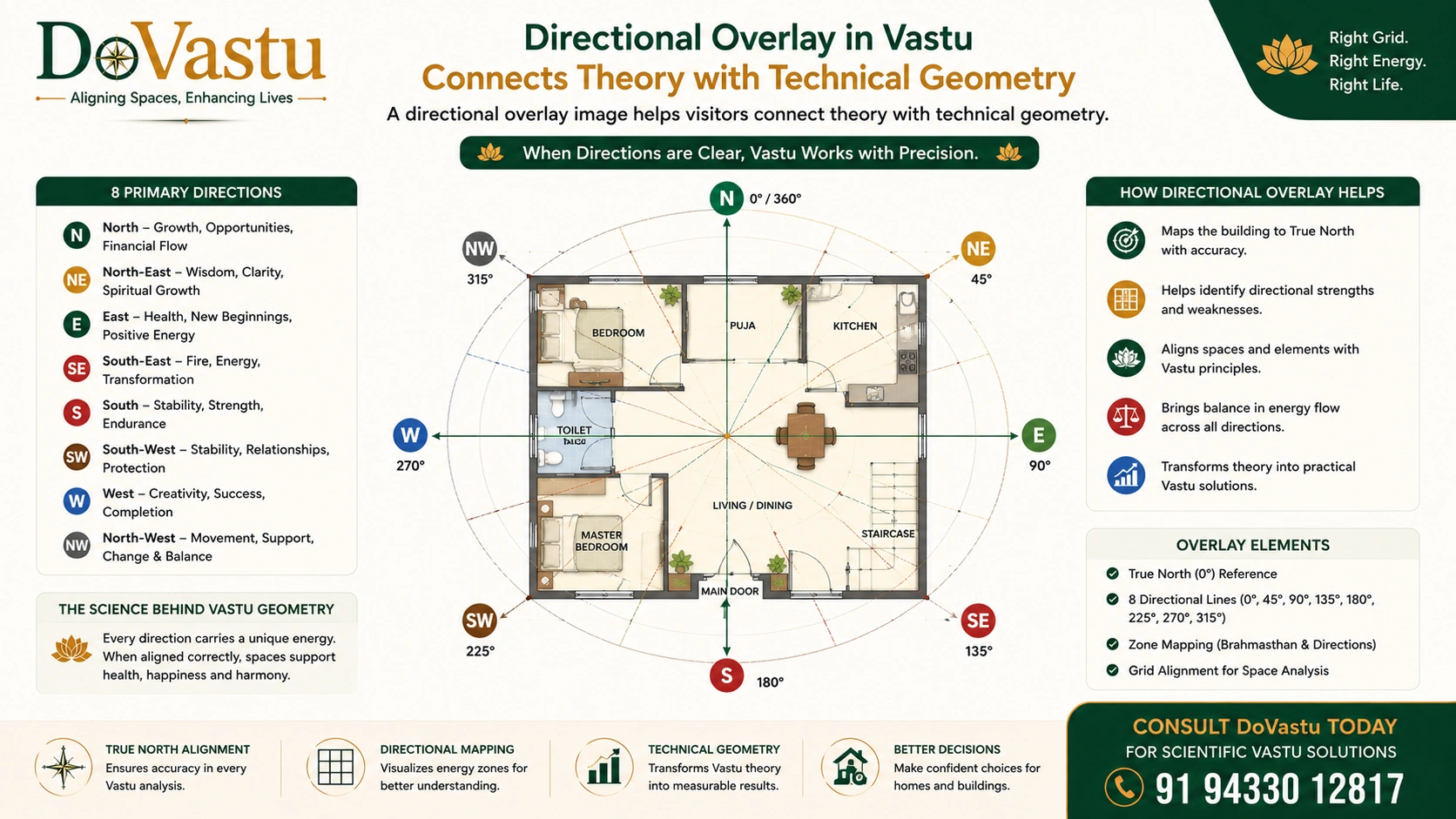
16-Zone Direction Overlay Upload 16-Zone Direction Overlay
images/geogebra-3.jpg

A directional overlay image helps visitors connect theory with technical geometry.

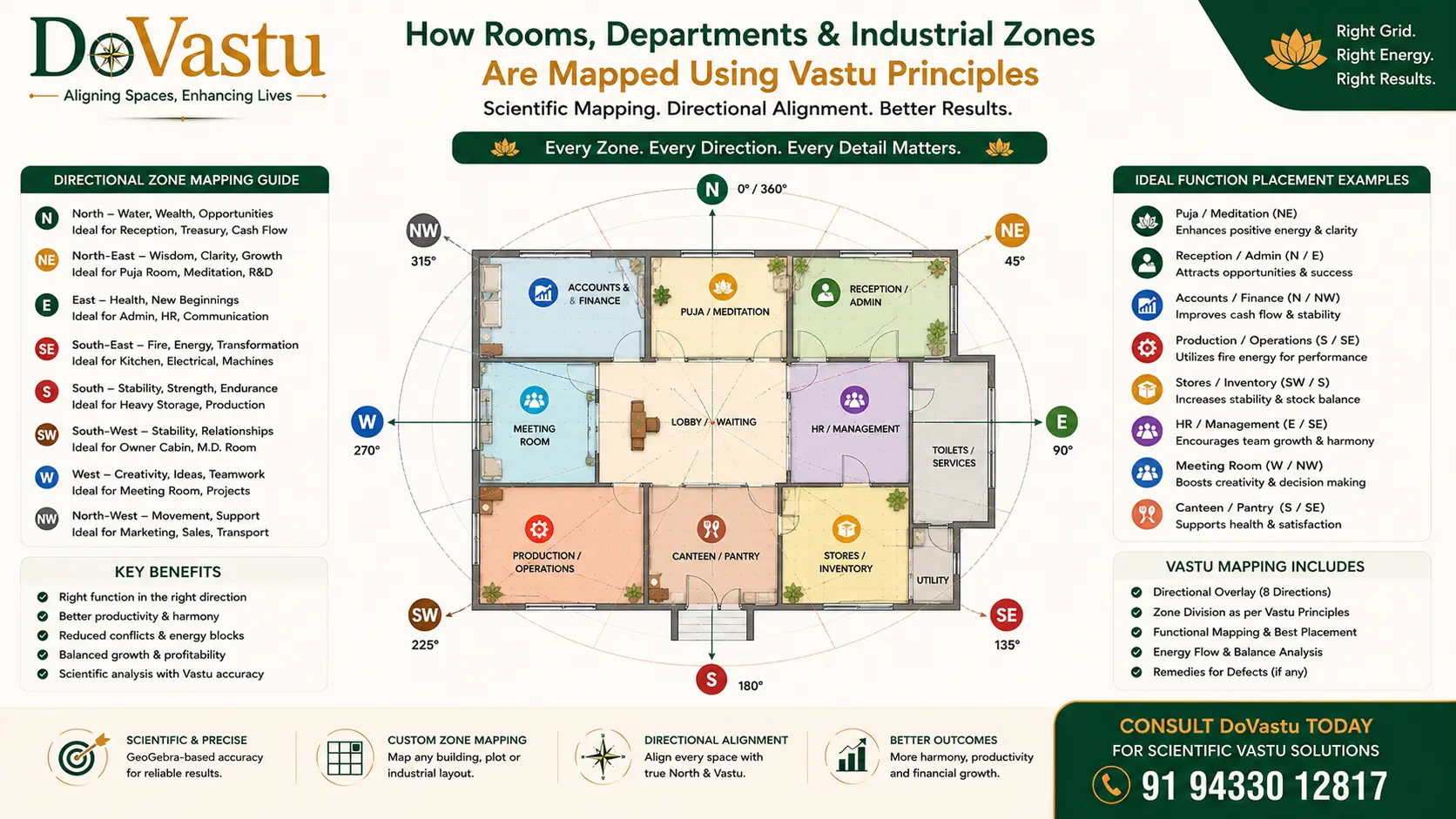
Vastu Function Mapping in GeoGebra Upload Function Mapping
images/geogebra-4.jpg

Perfect for demonstrating how rooms, departments, or industrial zones are mapped.

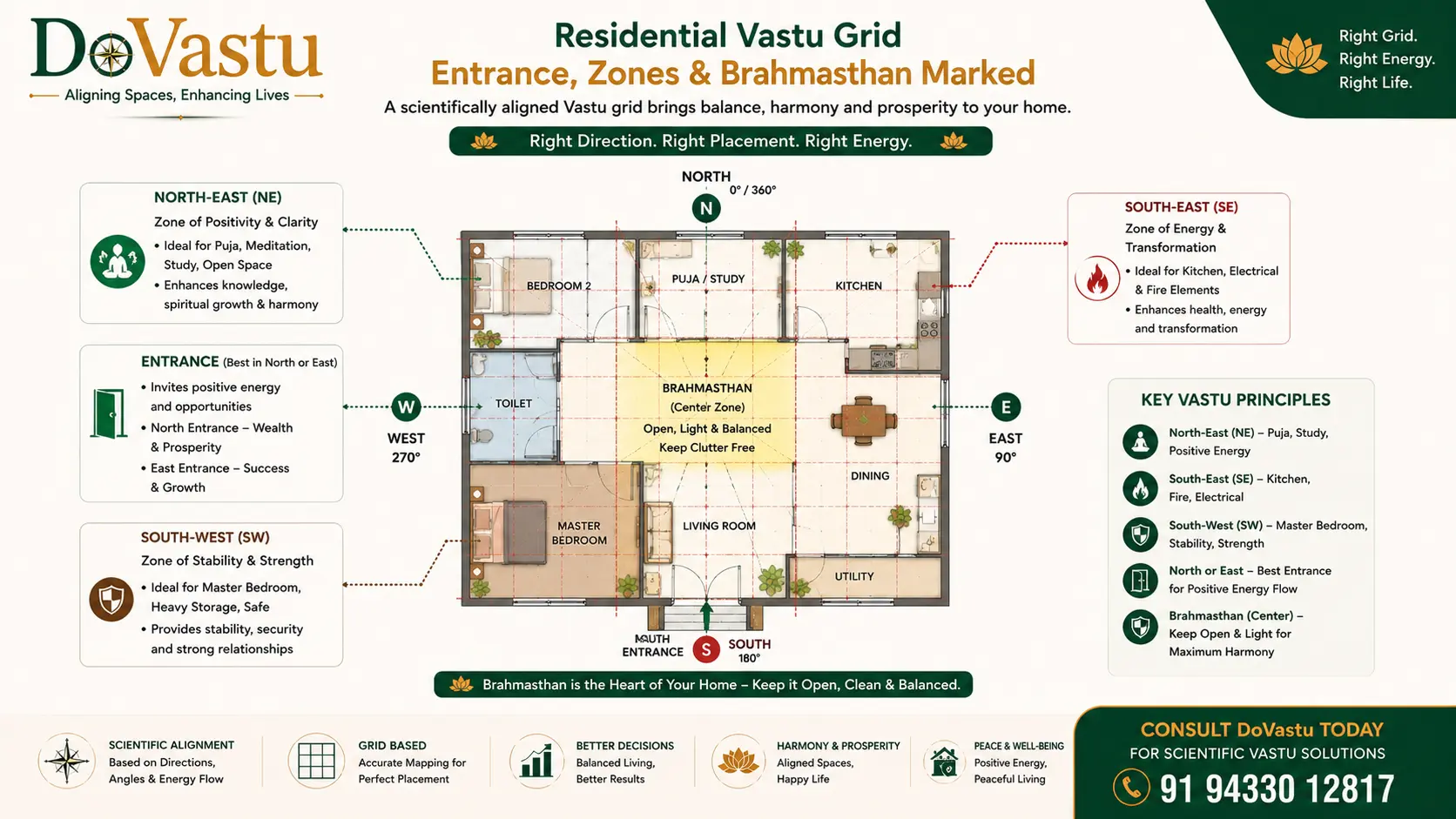
Residential Vastu GeoGebra Grid Example Upload Residential Example
images/geogebra-5.jpg

Use this slot for a residential grid with entrance, North-East, South-East, South-West, and Brahmasthan marked.

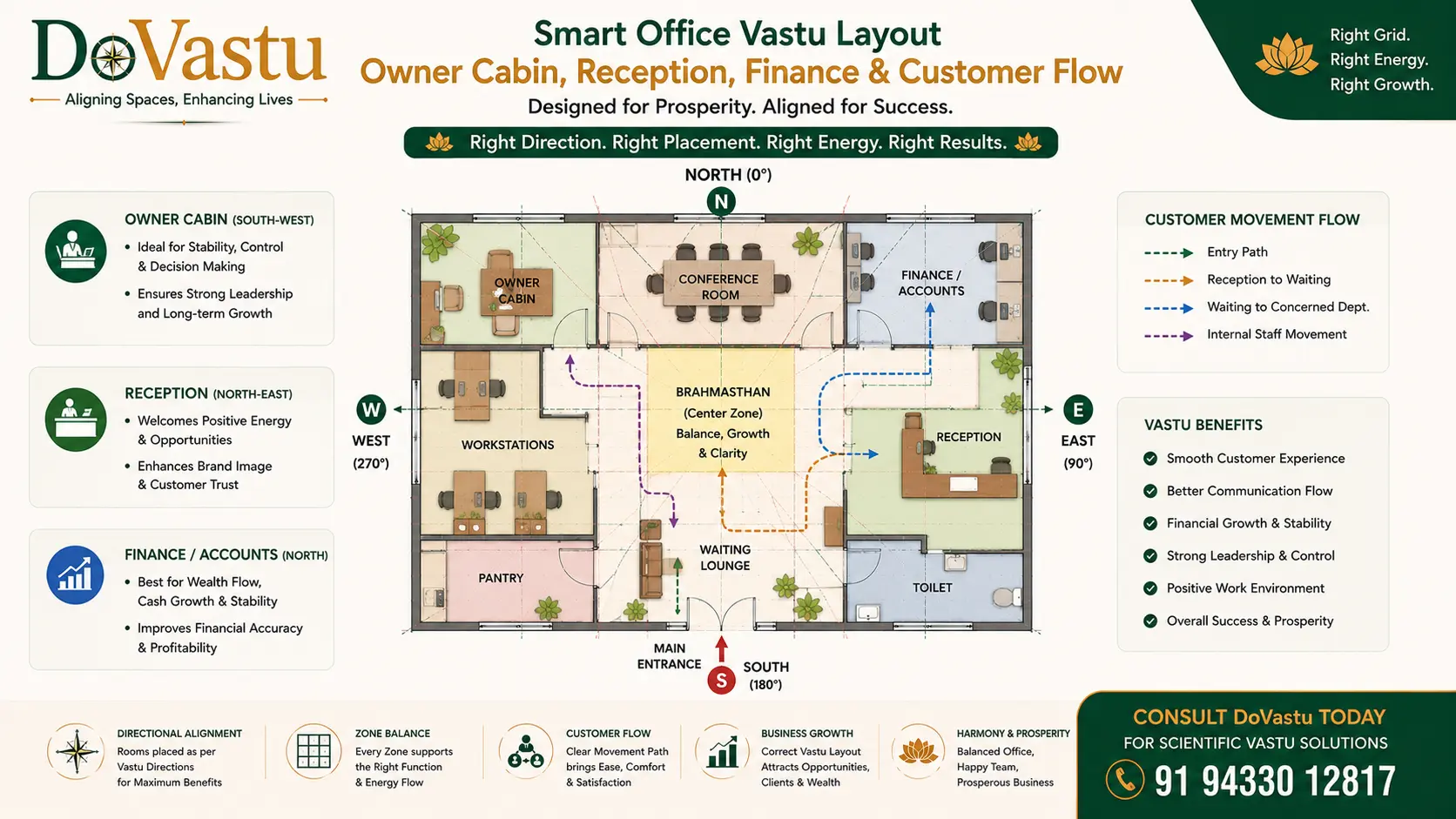
Commercial Vastu GeoGebra Grid Example Upload Commercial Example
images/geogebra-6.jpg

Best for owner cabin, reception, finance, and customer movement visualization.

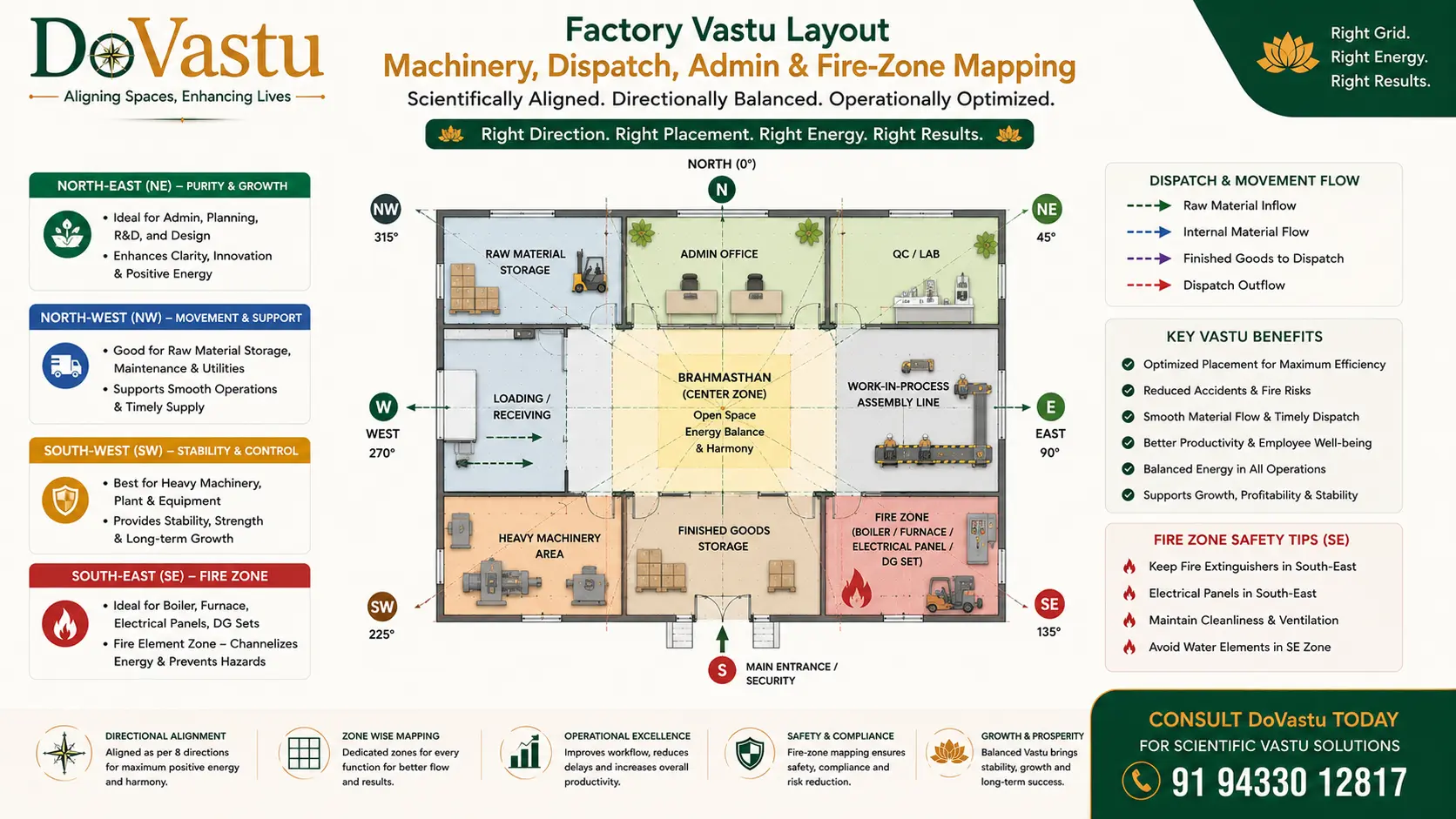
Industrial Vastu GeoGebra Grid Example Upload Industrial Example
images/geogebra-7.jpg

Use for machinery, dispatch, admin, and fire-zone mapping in factory layouts.

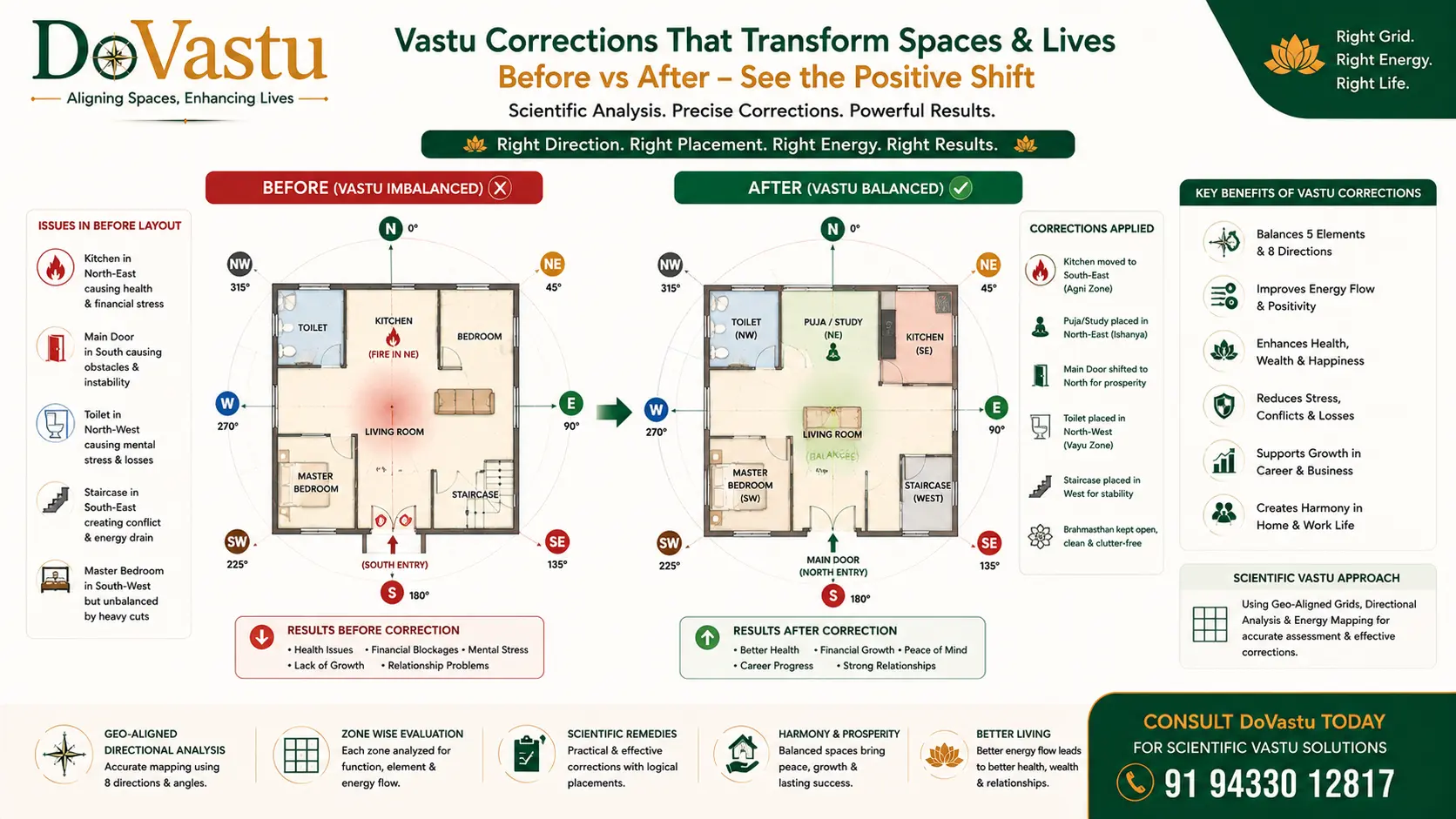
Vastu Defect and Correction Matrix Upload Defect / Correction Matrix
images/geogebra-8.jpg

A before-after comparison makes the correction methodology easier to understand.

Full methodology

Complete Source Content in a Multi-Column Layout

All sections from the uploaded document are preserved below in a more magazine-style two to three column standard for better reading and presentation.

1. Purpose of the System

Complete section content preserved from the source document.

This kit is designed to help you

take an actual property layout

align it with true directions

divide it into Vastu zones

study function vs direction

identify defects

recommend practical corrections

It turns Vastu from a rough directional reading into a repeatable geometric workflow.

2. Core System Structure

Complete section content preserved from the source document.

The kit has 7 working layers

Direction Establishment

Scaled Layout Import

Primary Axis Construction

Grid Generation

Functional Zoning

Defect Detection

Correction Mapping

3. Required Inputs

Complete section content preserved from the source document.

For every property, collect these first
Basic Inputs

site address

Google Earth orientation

plot shape

boundary dimensions

built-up layout plan

entrance location

room/function labels

Preferred Technical Inputs

CAD/PDF/image of layout

at least one known dimension for scaling

north reference from site

plot corner points if available

4. Tools Required

Complete section content preserved from the source document.

Primary Tools

GeoGebra

Google Earth

compass reading or site north reference

dimensioned layout plan

Optional Supporting Tools

AutoCAD or PDF editor

image cleanup tool

spreadsheet for zoning summary

5. Standard GeoGebra Workflow

Complete section content preserved from the source document.

Step 1: Import Layout

Insert the floor plan or plot image into GeoGebra.

Method

Open GeoGebra Geometry or Classic

Insert image

place image near origin

lock image after positioning

Step 2: Set Scale

Use one known dimension.

Example
If one wall is 10 meters

draw a GeoGebra line of 10 units

resize imported plan proportionally

match the known wall length

Without scaling, the grid may look correct visually but will not be technically dependable.

Step 3: Establish True North

Take true north from Google Earth.

Important

Do not rely blindly on a hand-held magnetic reading unless verified.

Draw

vertical North-South axis

horizontal East-West axis

These become the master reference.

Step 4: Rotate Layout to Actual Orientation

If the property is tilted relative to north

rotate the imported layout by the exact angle

align actual property north with GeoGebra north

This is one of the most important steps.

Step 5: Mark Property Boundary

Trace the plot or built area.

Use

polygon tool

segment tool

point tool

Create

outer plot boundary

built structure boundary

room outlines if needed

Step 6: Find Geometric Center

For the plot or built area

identify center

use midpoint / centroid logic as applicable

This center becomes the reference for directional sector division.

Step 7: Create Direction Rays

From the center point, draw rays.

Versions

8-direction system: every 45°

16-direction system: every 22.5°

32-direction system: every 11.25° for advanced work

Recommended professional standard

Use 16-direction grid for most client work.

Step 8: Create Sector Zones

Convert rays into directional sectors.

For 16 directions, define

North

North-North-East

North-East

East-North-East

East

East-South-East

South-East

South-South-East

South

South-South-West

South-West

West-South-West

West

West-North-West

North-West

North-North-West

Step 9: Overlay Functional Zones

Now map the actual layout onto these sectors.

Mark

main door

master bedroom

children bedroom

kitchen

toilet

puja

living

dining

staircase

office cabin

machine zone

dispatch

cash

storage

This is where Vastu becomes practical.
6. Recommended Layering System in GeoGebra

Complete section content preserved from the source document.

Keep the work organized with layers or color logic.

Suggested Structure

Layer A

imported image

Layer B

property outline

Layer C

north-south / east-west axis

Layer D

16-direction rays

Layer E

room polygons / functional areas

Layer F

annotations and defect notes

Layer G

correction suggestions

7. Standard Color Logic

Complete section content preserved from the source document.

Use consistent visual logic.

Green: ideal placement

Yellow: acceptable / moderate

Red: defect / conflict

Blue: neutral or support zones

Dark outline: actual structure boundary

This helps when presenting to clients.

8. Residential Vastu Gridding Kit

Complete section content preserved from the source document.

Primary Residential Zones to Check

entrance

North-East

South-West

South-East

North

Brahmasthan

toilet placement

staircase

bedroom distribution

Residential Functional Rules

North-East

Best for

puja

meditation

open light space

Avoid

toilet

heavy storage

septic load

South-East

Best for

kitchen

controlled fire activity

Avoid

master bedroom

South-West

Best for

master bedroom

owner stability

heavy load

Avoid

toilet

cut corner

empty space

North

Best for

cash movement

open access

entry support

Avoid

full blockage

Residential Output Template
For each house, report in this format

actual plot orientation

entrance sector

NE status

SE status

SW status

North status

center status

functional conflicts

practical remedies

priority order of correction

9. Commercial Vastu Gridding Kit

Complete section content preserved from the source document.

Main Commercial Zones

main entrance

reception

owner cabin

accounts / finance

workstations

conference room

display area

customer movement

Commercial Functional Rules

South-West

Best for

owner / decision maker

North

Best for

finance / cash movement

East / North-East

Best for

reception / visibility / openness

North-West

Useful for

movement-heavy departments

marketing / sales / logistics flow

Commercial Diagnostic Questions

Is the owner sitting in a weak movement zone?

Is the finance desk blocked or misplaced?

Does customer flow terminate too early?

Is entry strong but conversion weak?

Are staff zones placed in low-productivity sectors?

Commercial Output Template

business type

entry sector

owner cabin sector

finance sector

customer circulation review

display / work zoning

conversion obstacles

correction plan

10. Industrial Vastu Gridding Kit

Complete section content preserved from the source document.

Primary Industrial Zones

main gate

admin

production

raw material

finished goods

dispatch

boiler / fire / electrical

heavy machinery

staff movement

water bodies

Industrial Functional Rules

South-West

Best for

heavy machinery

raw material

stable load

South / West

Good for

production zones

medium-heavy operational weight

North-West

Good for

dispatch

outward movement

logistics

South-East

Good for

electrical

heat/fire activity

boiler/transformer zones

North / East

Useful for

admin

accounts

movement support

open inflow

Industrial Diagnostic Questions

Is heavy load placed in unstable zones?

Is dispatch blocked by a fixed zone?

Is admin sitting in production-heavy sectors?

Is fire equipment in water/clarity zones?

Is movement cross-conflicting with storage?

Industrial Output Template

plant orientation

gate sector

machinery sector

dispatch sector

admin sector

fire/electrical sector

heavy vs light balance

operational friction points

recommended zoning correction

11. Door Analysis Module

Complete section content preserved from the source document.

Door is important, but not the whole reading.

For every entrance, record

exact directional sector

whether it supports the property type

whether the adjacent functional flow is correct

whether blockage exists before or after entry

Door Review Fields

direction

sub-direction

level difference

obstruction

visual openness

circulation quality

functional continuity after entry

12. Defect Detection Matrix

Complete section content preserved from the source document.

Use this matrix in every case.

A. Directional Defects

blocked north

loaded north-east

weak south-west

wrong fire zone

over-open west

disturbed north-west

B. Functional Defects

toilet in NE

bedroom in SE

master bed outside SW

kitchen outside fire-supportive zone

owner cabin in unstable sector

dispatch in fixed zone

C. Structural Defects

cut corner

extension imbalance

center obstruction

wrong slope logic

wrong load distribution

D. Flow Defects

entry-to-wall collision

broken circulation

trapped movement

dead-end customer flow

blocked dispatch

13. Correction Strategy Framework

Complete section content preserved from the source document.

Corrections should be prioritized in this order

Level 1: Functional Shift

Change use of room/zone without breaking structure.

Level 2: Internal Rearrangement

Move bed, desk, equipment, storage, counters.

Level 3: Load Balancing

Increase or reduce weight in a zone.

Level 4: Entry Adjustment

Refine how entry is used or activated.

Level 5: Structural Correction

Only when absolutely necessary.

14. Client Presentation Format

Complete section content preserved from the source document.

When presenting findings, use this order

property orientation

grid visualization

ideal vs actual zoning

major defects

real-life impact

correction options

priority plan

This makes the consultation feel professional and credible.

15. Suggested GeoGebra File Structure

Complete section content preserved from the source document.

Create reusable templates

File 1

8-direction basic template

File 2

16-direction professional template

File 3

32-direction advanced template

File 4

residential analysis template

File 5

commercial analysis template

File 6

industrial analysis template

16. Reusable Naming System

Complete section content preserved from the source document.

Use consistent names inside GeoGebra.

Example

P_center

Axis_NS

Axis_EW

Ray_NE

Sector_SW

Door_Main

Room_Kitchen

Zone_Finance

Defect_NE_Toilet

This makes future edits easier.

17. Suggested Deliverables for DoVastu

Complete section content preserved from the source document.

Turn this into a client-facing service package.

Basic Deliverable

direction-marked layout

defect summary

short corrections

Professional Deliverable

GeoGebra grid analysis

sector-wise comments

functional conflict map

written recommendations

Premium Deliverable

GeoGebra report

Astro-Vastu integration

correction priority matrix

follow-up support

18. Service Positioning for DoVastu

Complete section content preserved from the source document.

Use this positioning statement

DoVastu uses scientific GeoGebra-based Vastu gridding to convert property layouts into measurable directional intelligence systems for real-life correction and growth.

That is a strong differentiator.

19. Training Module Version

Complete section content preserved from the source document.

You can also use this kit to train staff or students.

Module Structure

Module 1: Direction basics

Module 2: GeoGebra setup

Module 3: Plot alignment

Module 4: 8 vs 16 grid

Module 5: Residential casework

Module 6: Commercial casework

Module 7: Industrial casework

Module 8: Correction reporting

20. Final Working Formula

Complete section content preserved from the source document.

Use this as the core DoVastu algorithm

True Direction + Scaled Layout + 16-Zone Grid + Functional Mapping + Defect Detection + Practical Correction = Scientific Vastu Outcome

21. Ready-to-Use DoVastu Consultation Checklist

Complete section content preserved from the source document.

Pre-Analysis

collect site address

collect layout

confirm dimensions

confirm north

identify property use

Analysis

scale plan

align north

build grid

map function

mark defects

define corrections

Reporting

summarize key issues

rank issues by severity

recommend lowest-disruption corrections

explain expected improvement

22. Closing Position

Complete section content preserved from the source document.

This GeoGebra Vastu System Kit gives you a framework that is

technically credible

scalable

easy to present

easy to standardize

strong for branding DoVastu as a scientific Vastu service

Layout update: This version keeps the full document content while changing the internal content area from a mostly single-column flow into a cleaner two to three column card-based standard.

The header, footer, and reference CSS structure remain unchanged, while the internal section cards now read more like a premium editorial or methodology page.

Use This Page as a Premium Methodology Showcase

This regenerated HTML is designed for direct website use, internal review, and further content expansion without losing the source methodology.

  • Full document text carried into the HTML file
  • 2–3 column internal reading layout on larger screens
  • Exact reference header and footer retained unchanged
  • CSS embedded directly inside the page
  • 8 image placeholders included inside the layout